What it is
Lazy SEO is an SEO and market-research toolkit that runs on your own computer. One double-click starts it, and it opens in your browser at http://localhost:4747.
Thirteen tools share one workspace: keyword ideas, keyword difficulty, topic and trend research, competitor analysis, ad and shop research, a site audit, content briefs, small generators and an optional AI Copilot. A result in one tool opens in the next with one click.
No account, no subscription, no credits. Every number comes from a live public source, the app shows how each score is calculated, and it never invents search volumes.
Who it is for
- Bloggers and creators — find questions nobody has answered well, and get a brief before writing.
- E-commerce and dropshipping sellers — see what successful stores launch, discount and advertise.
- Freelancers and agencies — a quick audit and a content gap before the first client meeting.
- Small and local businesses that cannot justify a monthly SEO subscription.
Install and start
1. Install Node.js (once)
Lazy SEO needs Node.js, a free runtime. Download the LTS version from nodejs.org and install it with the default options (18.17 or newer).
2. Download and unzip
Click Download free at the top of this page. Right-click LazySEO-v1.0.0.zip → Extract All… into a folder you can write to, for example Documents\Lazy SEO — not Program Files, because the app keeps its cache in a data folder next to itself. Do not run it from inside the zip viewer.
3. Double-click start.bat
A black window opens. The very first start prints "First start: installing the optional AI Copilot package..." — it needs the internet and takes about a minute. If it fails, Lazy SEO still works; only the AI Copilot needs that package.
Then the window shows LAZY SEO 1.0.0 with the address, and your browser opens by itself. The first start also downloads a roughly 10 MB authority index; the sidebar says "Loading authority data…" until it turns to Live data connected. On macOS or Linux, run npm start in a terminal instead.
4. The black window, and how to stop it
That window is the Lazy SEO server — the small program that fetches data for the page in your browser. Keep it open (minimised is fine) while you work. If you close the browser tab, open http://localhost:4747 again.
To stop, press Ctrl + C in the window (answer Y if asked) or just close it. To start again, double-click start.bat.
5. SmartScreen and firewall prompts
start.bat is a downloaded script, not a signed installer, so Windows may show "Windows protected your PC" or an "Open File – Security Warning". Click More info → Run anyway (or Run).
Lazy SEO listens on your own machine only (127.0.0.1), so Windows Firewall normally stays silent. If it does ask about Node.js you can click Cancel — the app needs no incoming connections.
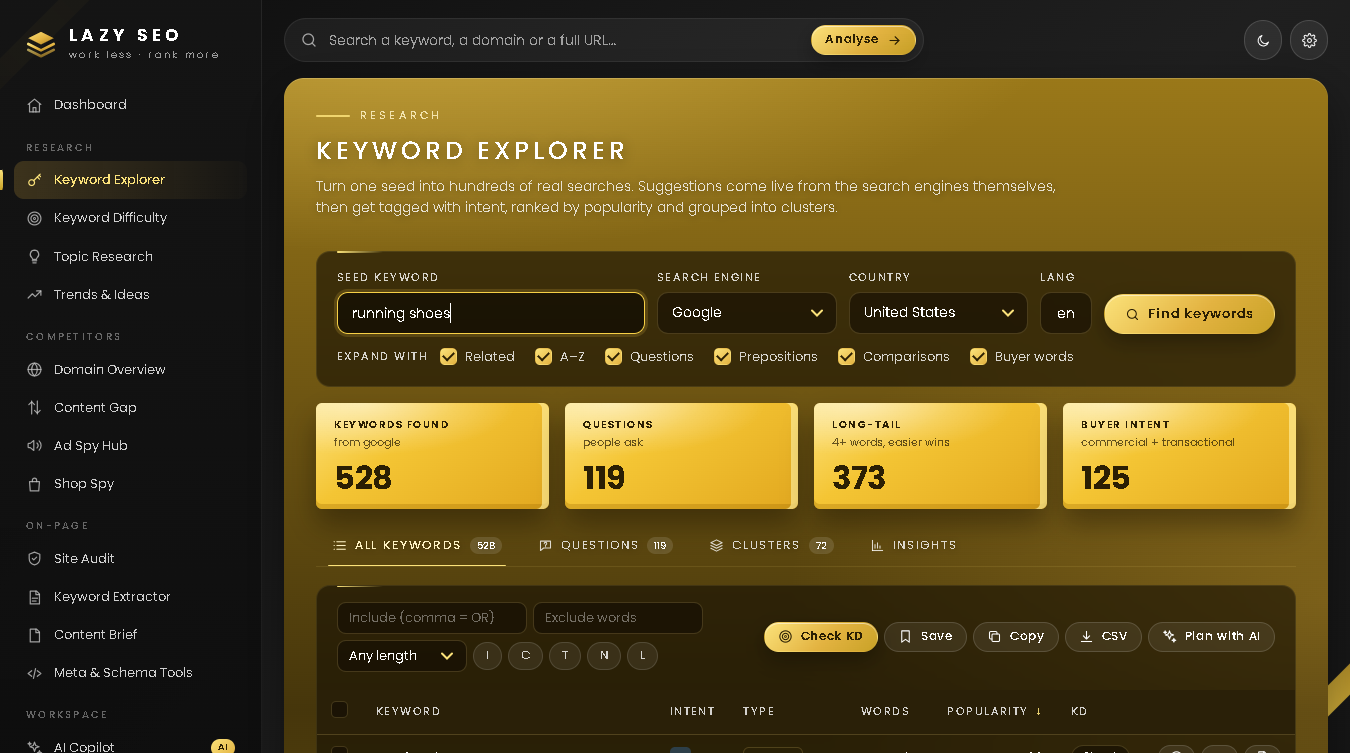
Keyword Explorer — type a Seed keyword, pick a Search engine (Google, YouTube, Bing, Amazon, DuckDuckGo, Wikipedia or all engines), a Country and a language code, and press Find keywords. By default the seed is expanded A–Z and with questions, prepositions, comparisons and buyer words (untick what you do not need). The sortable table shows Intent, Type, Words, Popularity and KD; the tabs Questions, Clusters and Insights regroup the same list. Filter, then Check KD, Save, Copy or CSV.
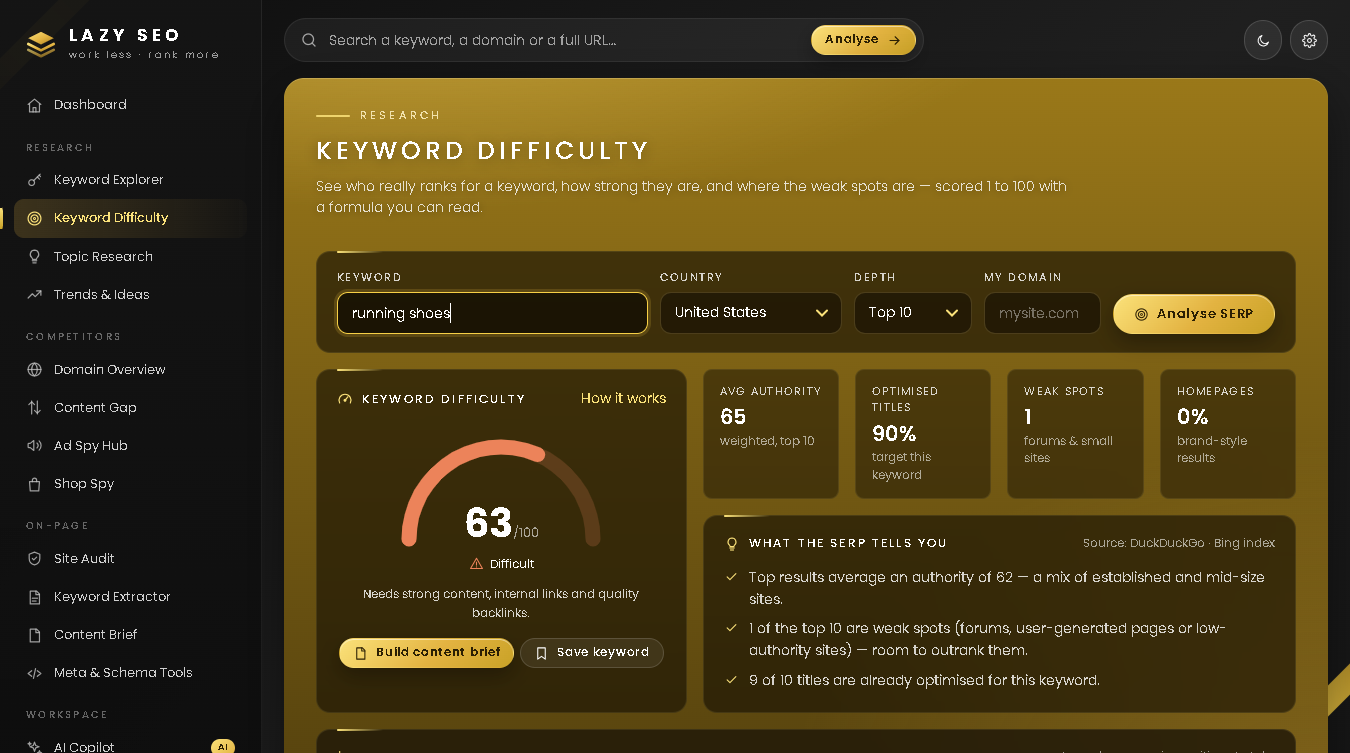
Keyword Difficulty — enter a keyword, a country, a depth (Top 10, 20 or 30) and optionally My domain, then press Analyse SERP. A gauge shows a 1–100 score from "Very easy" to "Very hard"; below are the average authority, the weak spots and the live results. How it works shows the exact formula.
Topic Research — one topic returns Questions, Prepositions, Comparisons, ready-made Headlines and Discussions.
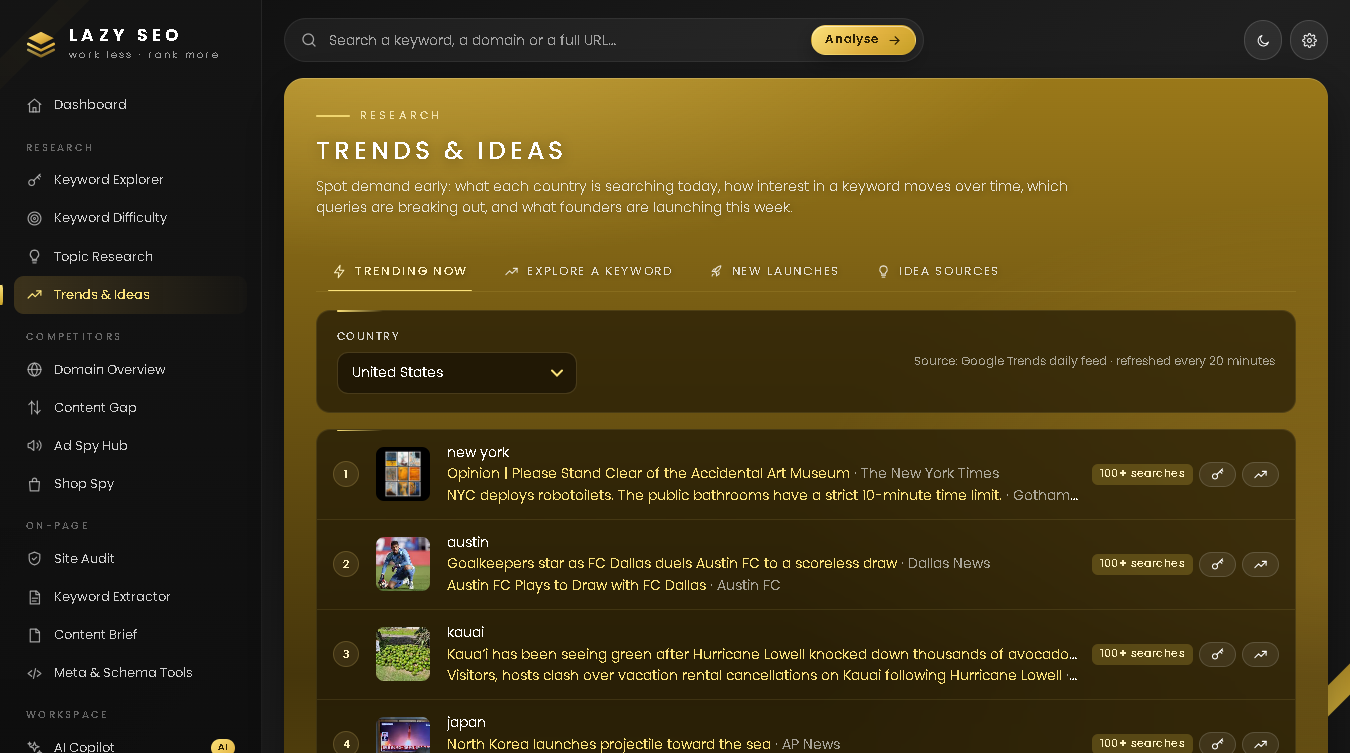
Trends & Ideas — Trending now per country, Explore a keyword (compare up to five terms by region and period), New launches, and Idea sources, which opens a dozen research sites with your search filled in.
Example: in Keyword Explorer type running shoes, keep Google and United States, and press Find keywords. Set the length filter to 4+ words, tick ten rows and press Check KD. Save the ones that score under 30.
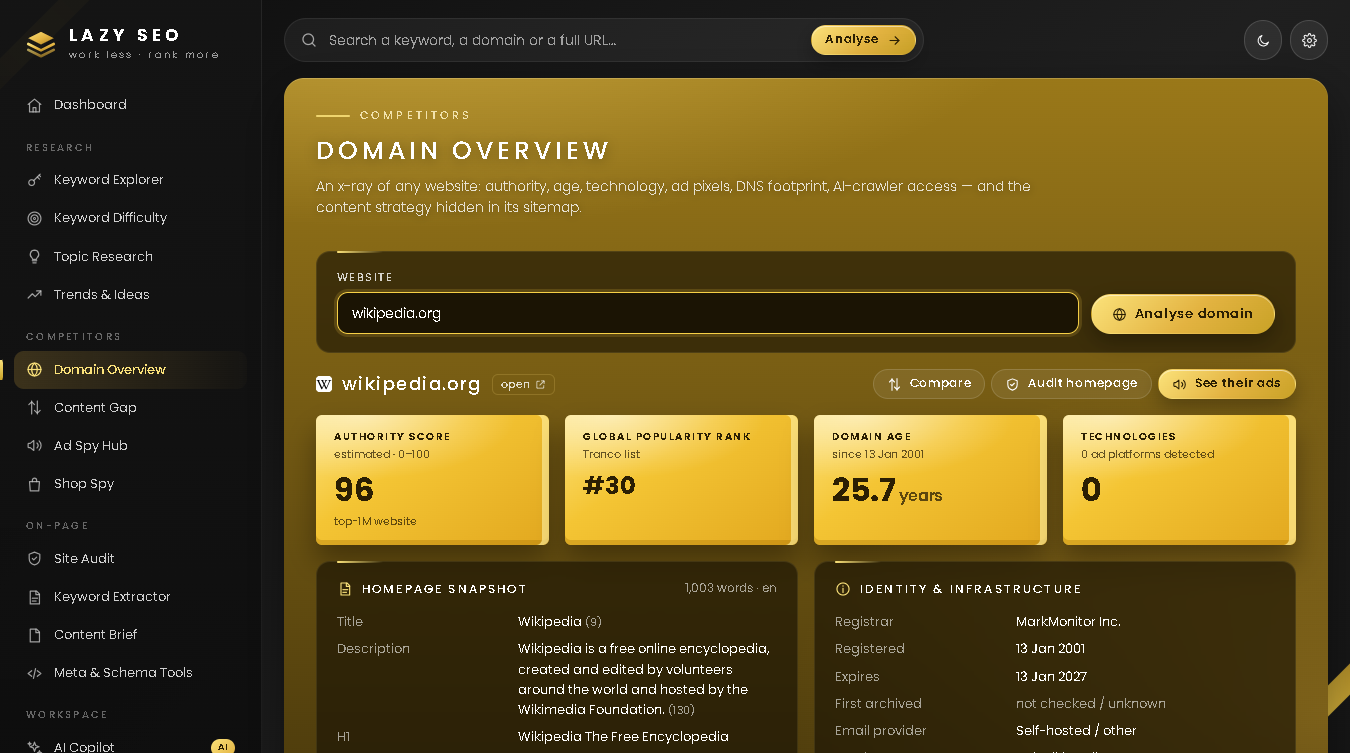
Domain Overview — enter a website and press Analyse domain: estimated authority, global popularity rank, domain age, registrar, email and DNS provider, technology stack, ad pixels, AI-crawler access, social profiles, and the content strategy read from the public sitemap.
Content Gap — enter Your website and up to three competitors and press Find the gap. You get a side-by-side table and the tabs Missing topics, Missing themes, Shared and Only you.
Ad Spy Hub — one brand, keyword or domain becomes ready-made searches in the public ad libraries (Facebook / Instagram, TikTok, Google, LinkedIn and more). They open in a new browser tab; nothing is scraped. The Pixel detector tab shows which ad platforms a page has installed.
Shop Spy — enter a Shopify or WooCommerce store and press Spy on store: best sellers, newest products, biggest discounts, median price, apps and a catalogue CSV.
Example: in Domain Overview type wikipedia.org. In about ten seconds you see its authority, age, registrar, technology and which AI crawlers its robots.txt allows.
On-page tools
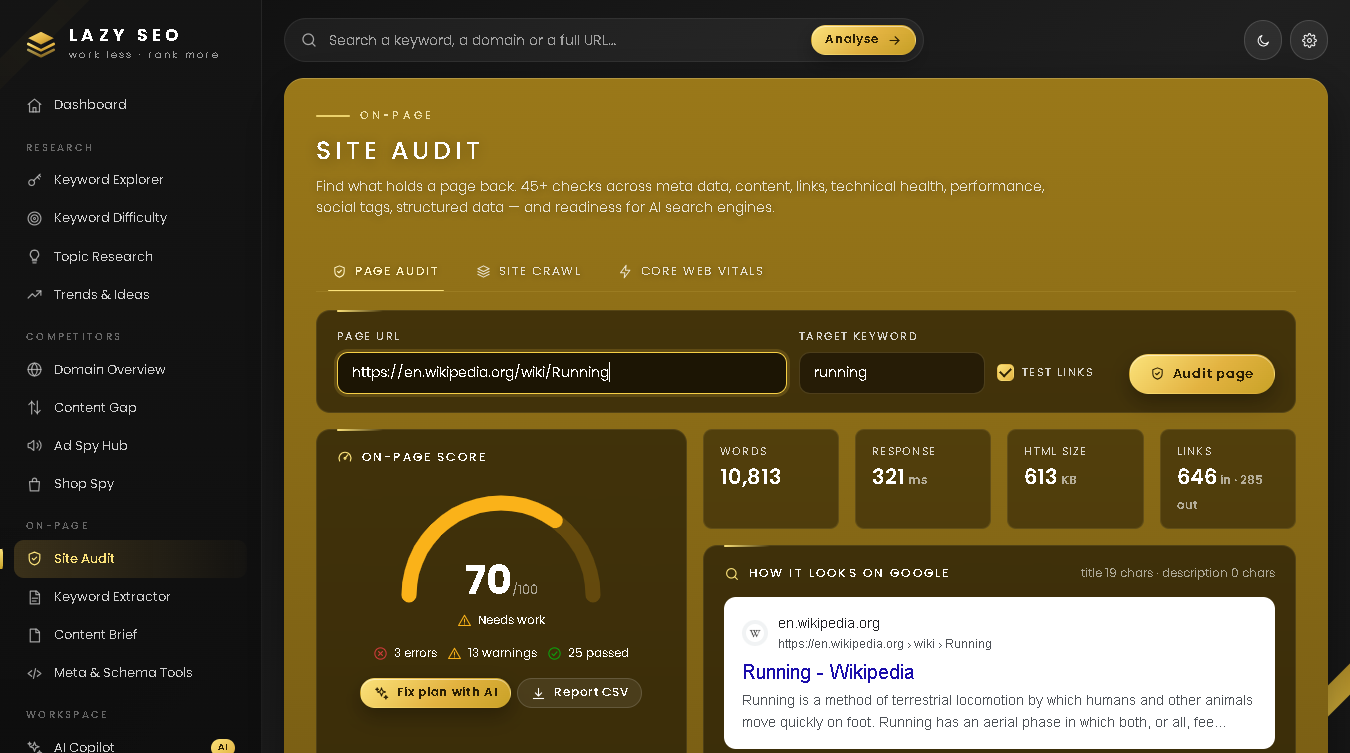
Site Audit has three tabs. Page audit: paste a URL, optionally a target keyword, and press Audit page — a score and grade, a Google preview and 45+ checks, each with a plain-language fix. Site crawl: up to 150 pages, three at a time, obeying robots.txt. Core Web Vitals: Google's own speed test, 20–40 seconds.
Keyword Extractor — paste text or fetch it from a URL: word count, readability, and 1–4 word phrases with density. Pasted text is analysed inside your browser. Bangla and Hindi are supported.
Content Brief — enter a target keyword and press Build brief. Lazy SEO reads the ranking pages (10–25 seconds) and returns a target length, shared phrases, questions and each competitor's outline. Copy it or download it as .md.
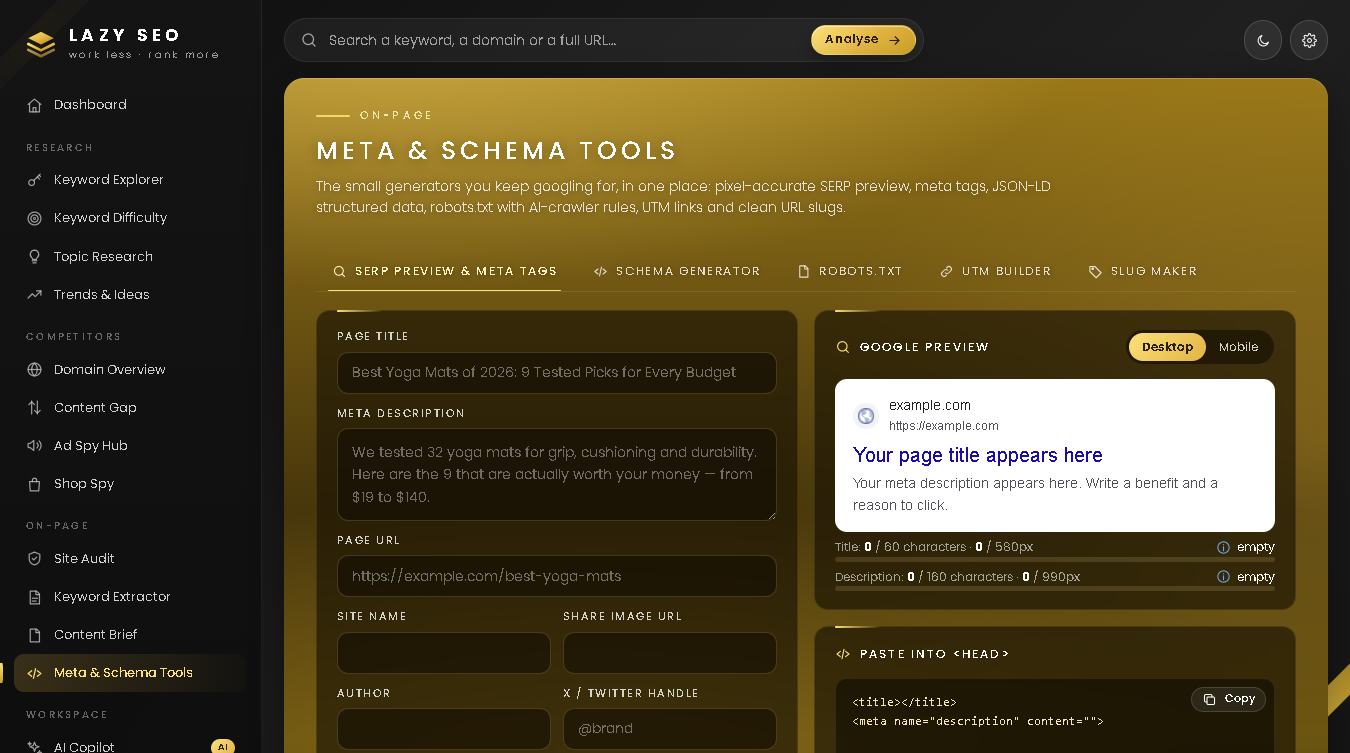
Meta & Schema Tools — a pixel-accurate SERP preview with meta tags, a JSON-LD schema generator, a robots.txt builder with AI-crawler rules, a UTM builder and a slug maker.
Example: open Site Audit, paste https://en.wikipedia.org/wiki/Running, type running as the target keyword and press Audit page. Keep the filter on Issues and download the Report CSV.
Workspace
AI Copilot (works with your own AI API key) turns your results into content plans, outlines, titles and meta descriptions, ad copy, rewrites and audit fix lists. Buttons such as Plan with AI send the current data there; review it and press Run.
My Keywords keeps your saved keywords in lists, with Check KD, Copy, CSV and Delete.
Settings holds your default country, language, My website and the optional keys. The search box in the top bar routes by itself: a keyword opens Keyword Explorer, a domain opens Domain Overview, a full page URL opens Site Audit.
Example: after the running shoes search press Plan with AI. The keywords arrive as attached data; press Run to get pillar pages and a publishing order.
Optional API keys
Everything works without keys; they only lift limits. Paste them under Settings → Optional API keys.
| Key |
What it unlocks |
Cost |
| Serper.dev API key |
Real Google results for Keyword Difficulty and Content Brief, "People also ask", no pauses, 25 keywords per bulk check instead of 10 |
2,500 free searches |
| Brave Search API key |
An alternative result source, used when no Serper key is set |
2,000 free per month |
| Google PageSpeed API key |
Removes the shared daily quota on Core Web Vitals tests |
Free |
| Meta Ad Library access token |
Lists Facebook and Instagram ads inside the Ad Spy Hub (EU / UK commercial ads) |
Free, verified account |
| AI key (the last field) |
Switches on the AI Copilot |
Pay-as-you-go to the AI provider |
Where keys live: in your browser's local storage on this computer. They go only to your own Lazy SEO server on localhost, which passes each one to its matching service and does not write it to disk. On a shared computer use Settings → Your local data → remove all.
Honest limits
- No monthly search volumes, no backlink index. No free, honest source exists. Popularity is a relative 1–100 estimate from autocomplete behaviour. Authority converts a site's position in the Tranco top-1M popularity list to 0–100; it measures popularity, not backlinks.
- Without a search key, difficulty uses DuckDuckGo results (Bing's index), not Google. Requests are spaced about three seconds apart. After a burst the endpoint refuses, and Lazy SEO pauses live searches for about 10 minutes. It never tries to get around a bot check.
- Results are cached on your disk: search results 12 hours, autocomplete 2 days, domain overview 3 hours, sitemaps 6 hours, shops and speed tests 2 hours, trending searches 20 minutes. A repeated lookup is instant but can be that old. Delete the files in
data\cache to force fresh data.
- If Google Trends rate-limits you, the chart falls back to Wikipedia page views and says so.
- Sites that block automated visitors give incomplete results. Shop Spy never estimates sales. The in-app Meta tab covers EU / UK commercial ads only.
Privacy
Lazy SEO runs on your PC. The server listens on 127.0.0.1 only and refuses requests that do not come from its own page. No account, no analytics, no telemetry. Nothing is sent to LazyCreation — no LazyCreation server is involved at all.
Stays on your computer: search history, saved keywords, settings and keys (browser local storage); the cache and the authority list (the data folder).
Outside services it contacts — each sees your IP address, plus:
- Autocomplete services (Google, YouTube, Bing, Amazon, DuckDuckGo, Wikipedia): the keyword you typed.
- DuckDuckGo search — or Serper.dev / Brave if you added a key: the keyword you check.
- The websites you analyse: ordinary page requests, like a browser visit. Your DNS resolver,
rdap.org and the Internet Archive see the domain name.
- Google Trends, Wikimedia, Product Hunt, Hacker News: the trend keyword, or nothing.
tranco-list.eu: a plain file download every two weeks.
- Google PageSpeed Insights: the URL you test. The Meta API: your search and token.
- The AI provider: your request and the attached data, only when you press Run.
Your browser also loads the app font from Google Fonts and small site icons from Google's favicon service, so Google can see the domain names shown in your result tables.
Troubleshooting
"Node.js is not installed." Install the LTS version from nodejs.org and run start.bat again. If the message stays, restart the PC once.
The black window closes at once. Check that the zip was fully extracted and the folder is writable.
Port in use. If port 4747 is taken, Lazy SEO tries the next ten ports by itself — open the address printed after "Open" in the black window. Saved keywords and keys are stored per address, so on another port they look empty; close the other Lazy SEO window and restart to get 4747 back.
Blank page, or "Server offline" in the sidebar. The black window was closed — run start.bat again. Always open http://localhost:4747, never the index.html file itself. Use a current Chrome, Edge or Firefox and press Ctrl + F5.
Rate-limited. "The free search endpoint has asked Lazy SEO to slow down" means: wait about 10 minutes (checked keywords still open from the cache), or add a Serper.dev or Brave key. "Shared PageSpeed quota is used up": add the free PageSpeed key.
"Authority database not loaded yet" in the black window. The first start needs the internet. Check the connection and restart.
AI Copilot says it needs one extra package. Run start.bat again while online; it installs the package by itself.
Uninstall
- Optional: in Settings → Your local data, clear the history, saved keywords and keys.
- Close the black window.
- Delete the Lazy SEO folder — the cache and the authority list are inside it.
Lazy SEO adds no services, startup entries or registry values. Remove Node.js from Windows Settings → Apps if nothing else needs it.
FAQ
Is it really free?
Yes. No account, no trial, no credits. Only the optional third-party keys can cost money, and that is between you and that service.
Does it work offline?
No, the data is live. Only pasted text in the Keyword Extractor and the Meta & Schema generators work without the internet.
Why is the difficulty score different from paid tools?
Every tool has its own formula. Lazy SEO's is open: use it to compare keywords with each other, not across tools.
Can I research Bangla keywords?
Yes. Choose the country, set Lang to bn and type the seed in Bangla.
How do I update or move to another PC?
Extract the new zip to a fresh folder. Saved keywords and keys live in your browser, so export your lists as CSV before changing PC.
Changelog
v1.0.0 (2026-09-20) — First public release: thirteen tools across Research, Competitors, On-page and Workspace, My Keywords lists, CSV export, and the Gold and Noir themes.
এটা কী
Lazy SEO একটা SEO ও মার্কেট-রিসার্চ টুলকিট, যা আপনার নিজের কম্পিউটারে চলে। এক ডাবল-ক্লিকে চালু হয়, আর ব্রাউজারে http://localhost:4747 ঠিকানায় খোলে।
তেরোটা টুল এক জায়গায়: keyword আইডিয়া, keyword difficulty, topic ও trend রিসার্চ, competitor বিশ্লেষণ, ad ও shop রিসার্চ, site audit, content brief, ছোট ছোট জেনারেটর আর একটা ঐচ্ছিক AI Copilot। এক টুলের ফলাফল এক ক্লিকেই পরের টুলে খোলা যায়।
অ্যাকাউন্ট লাগে না, সাবস্ক্রিপশন নেই, ক্রেডিটের হিসাব নেই। প্রতিটা সংখ্যা আসে লাইভ পাবলিক সোর্স থেকে, কোন স্কোর কীভাবে হিসাব হয় তা অ্যাপেই দেখা যায়, আর বানানো search volume এটা কখনও দেখায় না।
কাদের জন্য
- ব্লগার ও কনটেন্ট ক্রিয়েটর — যে প্রশ্নগুলোর ভালো উত্তর এখনও কেউ দেয়নি সেগুলো খুঁজে বের করতে, আর লেখার আগে হাতে একটা brief পেতে।
- ই-কমার্স ও ড্রপশিপিং বিক্রেতা — সফল স্টোরগুলো কী লঞ্চ করছে, কীসে ছাড় দিচ্ছে আর কোথায় বিজ্ঞাপন দিচ্ছে তা দেখতে।
- ফ্রিল্যান্সার ও এজেন্সি — ক্লায়েন্টের সাথে প্রথম মিটিংয়ের আগেই ঝটপট একটা audit আর content gap তৈরি করতে।
- ছোট ও লোকাল ব্যবসা — যাদের পক্ষে মাসে মাসে SEO সাবস্ক্রিপশনের খরচ টানা সম্ভব না।
ইনস্টল ও চালু করা
১. Node.js ইনস্টল করুন (একবারই)
Lazy SEO চালাতে Node.js লাগে — এটা একটা ফ্রি রানটাইম। nodejs.org থেকে LTS ভার্সন নামিয়ে ডিফল্ট অপশনেই ইনস্টল করুন (18.17 বা তার নতুন)।
২. ডাউনলোড ও আনজিপ
এই পেজের উপরে Download free-তে ক্লিক করুন। LazySEO-v1.0.0.zip-এ রাইট-ক্লিক → Extract All… দিয়ে এমন ফোল্ডারে রাখুন যেখানে লেখার অনুমতি আছে, যেমন Documents\Lazy SEO — Program Files-এ না, কারণ অ্যাপ নিজের পাশেই একটা data ফোল্ডারে cache রাখে। zip ভিউয়ারের ভেতর থেকে চালাবেন না।
৩. start.bat-এ ডাবল-ক্লিক করুন
একটা কালো উইন্ডো খুলবে। একদম প্রথমবার এতে লেখা আসবে "First start: installing the optional AI Copilot package..." — এর জন্য ইন্টারনেট লাগে, মিনিটখানেক সময় নেয়। এটা ব্যর্থ হলেও Lazy SEO চলবে; প্যাকেজটা শুধু AI Copilot-এর জন্য দরকার।
এরপর উইন্ডোতে LAZY SEO 1.0.0 আর ঠিকানাটা দেখাবে, আর ব্রাউজার নিজে থেকেই খুলে যাবে। প্রথমবার প্রায় 10 MB-র একটা authority index-ও ডাউনলোড হয়; ততক্ষণ সাইডবারে "Loading authority data…" লেখা থাকে, শেষ হলে সেটা Live data connected হয়ে যায়। macOS বা Linux-এ terminal খুলে npm start চালান।
৪. কালো উইন্ডোটা কী, আর কীভাবে বন্ধ করবেন
ওই উইন্ডোটাই Lazy SEO সার্ভার — ছোট একটা প্রোগ্রাম, যা ব্রাউজারের পেজের জন্য ডেটা এনে দেয়। কাজের সময় এটা খোলা রাখুন (minimize করে রাখলেও চলবে)। ব্রাউজারের ট্যাব বন্ধ করে ফেললে আবার http://localhost:4747 খুলুন।
বন্ধ করতে উইন্ডোতে Ctrl + C চাপুন (জিজ্ঞেস করলে Y দিন), অথবা সরাসরি উইন্ডোটা বন্ধ করে দিন। আবার চালাতে start.bat-এ ডাবল-ক্লিক করুন।
৫. SmartScreen ও firewall প্রম্পট
start.bat ইন্টারনেট থেকে নামানো একটা স্ক্রিপ্ট, সাইন করা ইনস্টলার না — তাই Windows "Windows protected your PC" বা "Open File – Security Warning" দেখাতে পারে। More info → Run anyway (অথবা Run) দিন।
Lazy SEO শুধু আপনার নিজের মেশিনেই (127.0.0.1) শোনে, তাই Windows Firewall সাধারণত কিছু জিজ্ঞেস করে না। তবু Node.js নিয়ে প্রশ্ন এলে Cancel দিলেও চলবে — অ্যাপের কোনো incoming connection লাগে না।
Research টুল
Keyword Explorer — Seed keyword লিখুন, Search engine (Google, YouTube, Bing, Amazon, DuckDuckGo, Wikipedia বা সব engine একসাথে), Country আর ভাষার কোড বেছে নিয়ে Find keywords চাপুন। ডিফল্টভাবে seed-টা A–Z ধরে, আর question, preposition, comparison ও buyer word দিয়ে বাড়ানো হয় (যেটা লাগবে না তার টিক তুলে দিন)। sortable টেবিলে দেখাবে Intent, Type, Words, Popularity ও KD; Questions, Clusters ও Insights ট্যাব একই তালিকাকে অন্যভাবে সাজায়। ফিল্টার করুন, তারপর Check KD, Save, Copy বা CSV।
Keyword Difficulty — keyword, দেশ, গভীরতা (Top 10, 20 বা 30) আর চাইলে My domain দিয়ে Analyse SERP চাপুন। একটা গেজে 1–100 স্কোর দেখাবে, "Very easy" থেকে "Very hard" পর্যন্ত; নিচে গড় authority, weak spot আর লাইভ রেজাল্ট। How it works-এ পুরো ফর্মুলাটা দেখা যায়।
Topic Research — একটা topic দিলেই Questions, Prepositions, Comparisons, তৈরি Headlines আর Discussions পাবেন।
Trends & Ideas — দেশভিত্তিক Trending now, Explore a keyword (region ও সময়কাল ধরে পাঁচটা পর্যন্ত শব্দের তুলনা), New launches, আর Idea sources — যা ডজনখানেক রিসার্চ সাইট আপনার সার্চ বসিয়েই খুলে দেয়।
উদাহরণ: Keyword Explorer-এ running shoes লিখুন, Google আর United States রেখে Find keywords চাপুন। দৈর্ঘ্যের ফিল্টার 4+ words করুন, দশটা সারিতে টিক দিয়ে Check KD চাপুন। যেগুলোর স্কোর 30-এর নিচে, সেগুলো Save করে রাখুন।
Competitor টুল
Domain Overview — একটা ওয়েবসাইট লিখে Analyse domain চাপুন: আনুমানিক authority, global popularity rank, ডোমেইনের বয়স, registrar, email ও DNS provider, technology stack, ad pixel, AI crawler-এর অনুমতি, social profile, আর পাবলিক sitemap থেকে পড়া content strategy।
Content Gap — Your website আর সর্বোচ্চ তিনটা competitor দিয়ে Find the gap চাপুন। পাশাপাশি তুলনার একটা টেবিল পাবেন, সাথে Missing topics, Missing themes, Shared ও Only you ট্যাব।
Ad Spy Hub — একটা brand, keyword বা domain দিলে পাবলিক ad library-গুলোর (Facebook / Instagram, TikTok, Google, LinkedIn ইত্যাদি) জন্য তৈরি সার্চ লিংক পাবেন। সেগুলো ব্রাউজারের নতুন ট্যাবে খোলে; কিছুই scrape করা হয় না। Pixel detector ট্যাব দেখায় কোনো পেজে কোন কোন ad platform-এর pixel বসানো আছে।
Shop Spy — কোনো Shopify বা WooCommerce স্টোরের ঠিকানা দিয়ে Spy on store চাপুন: best seller, নতুন পণ্য, সবচেয়ে বড় ছাড়, median price, ব্যবহৃত app আর পুরো catalogue-এর CSV।
উদাহরণ: Domain Overview-এ wikipedia.org লিখুন। সেকেন্ড দশেকের মধ্যে এর authority, বয়স, registrar, technology আর robots.txt-এ কোন AI crawler অনুমতি পেয়েছে তা দেখতে পাবেন।
On-page টুল
Site Audit-এ তিনটা ট্যাব। Page audit: একটা URL আর চাইলে target keyword দিয়ে Audit page চাপুন — স্কোর ও গ্রেড, Google-এ কেমন দেখাবে তার প্রিভিউ আর 45টারও বেশি চেক পাবেন, প্রতিটার সাথে সহজ ভাষায় সমাধান। Site crawl: সর্বোচ্চ 150 পেজ, একসাথে তিনটা করে, robots.txt মেনে। Core Web Vitals: Google-এর নিজস্ব স্পিড টেস্ট, 20–40 সেকেন্ড লাগে।
Keyword Extractor — টেক্সট পেস্ট করুন বা URL থেকে আনুন: শব্দসংখ্যা, readability আর 1–4 শব্দের phrase ও তাদের density। পেস্ট করা টেক্সট আপনার ব্রাউজারের ভেতরেই বিশ্লেষণ হয়। বাংলা ও হিন্দি সাপোর্ট করে।
Content Brief — target keyword দিয়ে Build brief চাপুন। যেসব পেজ এখন rank করছে, Lazy SEO সেগুলো খুলে পড়ে (10–25 সেকেন্ড), তারপর জানায় কত শব্দ লেখা উচিত, কোন phrase-গুলো সবাই ব্যবহার করছে, কোন প্রশ্নের উত্তর দিতে হবে আর প্রতিটা competitor-এর outline। কপি করুন বা .md ফাইল হিসেবে নামান।
Meta & Schema Tools — পিক্সেল-নিখুঁত SERP preview ও meta tag, JSON-LD schema generator, AI crawler-এর নিয়মসহ robots.txt builder, UTM builder আর slug maker।
উদাহরণ: Site Audit খুলে https://en.wikipedia.org/wiki/Running পেস্ট করুন, target keyword হিসেবে running লিখে Audit page চাপুন। ফিল্টার Issues-এ রেখে Report CSV নামিয়ে নিন।
Workspace
AI Copilot (আপনার নিজের AI API key দিয়ে চলে) আপনার ফলাফল থেকে content plan, outline, title ও meta description, ad copy, rewrite আর audit-এর fix list বানিয়ে দেয়। Plan with AI-এর মতো বাটনগুলো চলতি ডেটা সেখানে পাঠায়; দেখে নিয়ে Run চাপুন।
My Keywords-এ আপনার সেভ করা keyword-গুলো লিস্ট ধরে সাজানো থাকে — সাথে Check KD, Copy, CSV ও Delete।
Settings-এ থাকে ডিফল্ট দেশ, ভাষা, My website আর ঐচ্ছিক key-গুলো। উপরের সার্চ বক্স নিজেই ঠিক টুলে নিয়ে যায়: keyword লিখলে Keyword Explorer, domain লিখলে Domain Overview, পুরো পেজের URL দিলে Site Audit।
উদাহরণ: running shoes সার্চের পর Plan with AI চাপুন। keyword-গুলো attached data হিসেবে চলে যাবে; Run চাপলে pillar page আর কোনটা আগে প্রকাশ করবেন তার ক্রম পাবেন।
ঐচ্ছিক API key
key ছাড়াই সব টুল চলে; key শুধু সীমা তুলে দেয়। Settings → Optional API keys-এ পেস্ট করুন।
| Key |
কী খুলে দেয় |
খরচ |
| Serper.dev API key |
Keyword Difficulty ও Content Brief-এ আসল Google রেজাল্ট, "People also ask", কোনো বিরতি নেই, একবারে 10-এর বদলে 25টা keyword-এর KD |
2,500 সার্চ ফ্রি |
| Brave Search API key |
বিকল্প রেজাল্ট সোর্স; Serper key না থাকলে ব্যবহার হয় |
মাসে 2,000 ফ্রি |
| Google PageSpeed API key |
Core Web Vitals টেস্টের শেয়ার্ড দৈনিক কোটা তুলে দেয় |
ফ্রি |
| Meta Ad Library access token |
Ad Spy Hub-এর ভেতরেই Facebook ও Instagram-এর ad দেখায় (EU / UK-র commercial ad) |
ফ্রি, verified অ্যাকাউন্ট লাগে |
| AI key (শেষ ঘরটা) |
AI Copilot চালু করে |
যতটুকু ব্যবহার ততটুকু বিল, সরাসরি AI provider-কে |
key কোথায় থাকে: এই কম্পিউটারে, আপনার ব্রাউজারের local storage-এ। এগুলো শুধু localhost-এ চলা আপনার নিজের Lazy SEO সার্ভারে যায়; সার্ভার প্রতিটা key তার নিজ নিজ সার্ভিসে পাঠায়, ডিস্কে লিখে রাখে না। কম্পিউটার অন্যরাও ব্যবহার করলে Settings → Your local data → remove all দিন।
সীমাবদ্ধতা, সোজাসুজি
- মাসিক search volume নেই, backlink index নেই। এ দুটোর কোনো ফ্রি ও সৎ সোর্স নেই। Popularity হলো autocomplete-এর আচরণ থেকে বের করা 1–100-এর একটা আপেক্ষিক অনুমান। Authority হলো Tranco top-1M popularity list-এ সাইটের অবস্থানকে 0–100-তে রূপান্তর; এটা জনপ্রিয়তা মাপে, backlink না।
- search key ছাড়া difficulty হিসাব হয় DuckDuckGo-র রেজাল্ট (Bing-এর index) থেকে, Google থেকে না। প্রতিটা request-এর মাঝে প্রায় তিন সেকেন্ড বিরতি থাকে। একসাথে অনেক চেক করলে endpoint মানা করে দেয়, তখন Lazy SEO প্রায় 10 মিনিট লাইভ সার্চ বন্ধ রাখে। bot check এড়ানোর চেষ্টা এটা কখনও করে না।
- ফলাফল আপনার ডিস্কে cache হয়: সার্চ রেজাল্ট 12 ঘণ্টা, autocomplete 2 দিন, domain overview 3 ঘণ্টা, sitemap 6 ঘণ্টা, shop ও speed test 2 ঘণ্টা, trending সার্চ 20 মিনিট। একই জিনিস আবার খুঁজলে সাথে সাথে আসে, তবে ততটা পুরনো হতে পারে। নতুন ডেটা চাইলে
data\cache-এর ফাইলগুলো মুছে দিন।
- Google Trends rate-limit করলে চার্ট Wikipedia page view-তে চলে যায়, আর সেটা জানিয়েও দেয়।
- যেসব সাইট automated visitor আটকায়, তাদের ফলাফল অসম্পূর্ণ আসে। Shop Spy কখনও বিক্রির অঙ্ক অনুমান করে না। অ্যাপের ভেতরের Meta ট্যাব শুধু EU / UK-র commercial ad দেখায়।
গোপনীয়তা
Lazy SEO আপনার PC-তেই চলে। সার্ভার শুধু 127.0.0.1-এ শোনে, আর নিজের পেজ ছাড়া অন্য কোথাও থেকে আসা request ফিরিয়ে দেয়। অ্যাকাউন্ট নেই, analytics নেই, telemetry নেই। LazyCreation-এর কাছে কিছুই পাঠানো হয় না — এর মধ্যে LazyCreation-এর কোনো সার্ভারই নেই।
যা আপনার কম্পিউটারেই থাকে: সার্চ history, সেভ করা keyword, settings ও key (ব্রাউজারের local storage); cache আর authority list (data ফোল্ডার)।
বাইরের যেসব সার্ভিসে যোগাযোগ হয় — প্রত্যেকেই আপনার IP address দেখে, সাথে:
- Autocomplete সার্ভিস (Google, YouTube, Bing, Amazon, DuckDuckGo, Wikipedia): আপনার লেখা keyword।
- DuckDuckGo search — অথবা key দিলে Serper.dev / Brave: যে keyword চেক করছেন।
- যে ওয়েবসাইট বিশ্লেষণ করছেন: সাধারণ পেজ request, ব্রাউজারে ভিজিট করার মতোই। আপনার DNS resolver,
rdap.org ও Internet Archive ডোমেইনের নামটা দেখে।
- Google Trends, Wikimedia, Product Hunt, Hacker News: trend-এর keyword, অথবা কিছুই না।
tranco-list.eu: দুই সপ্তাহে একবার একটা সাধারণ ফাইল ডাউনলোড।
- Google PageSpeed Insights: যে URL টেস্ট করছেন। Meta API: আপনার সার্চ ও token।
- AI provider: আপনার অনুরোধ আর attached data — শুধু Run চাপলে।
এ ছাড়া আপনার ব্রাউজার অ্যাপের ফন্ট Google Fonts থেকে আর সাইটের ছোট আইকনগুলো Google-এর favicon সার্ভিস থেকে আনে — ফলে রেজাল্ট টেবিলে যেসব ডোমেইনের নাম দেখা যায়, Google সেগুলো জানতে পারে।
সমস্যা সমাধান
"Node.js is not installed." nodejs.org থেকে LTS ভার্সন ইনস্টল করে আবার start.bat চালান। তবু একই লেখা এলে PC একবার restart দিন।
কালো উইন্ডো সাথে সাথে বন্ধ হয়ে যায়। দেখুন zip পুরোপুরি extract হয়েছে কি না, আর ফোল্ডারে লেখার অনুমতি আছে কি না।
Port ব্যস্ত (port in use)। 4747 port অন্য কিছু দখল করে রাখলে Lazy SEO নিজেই পরের দশটা port চেষ্টা করে — কালো উইন্ডোতে "Open"-এর পাশে যে ঠিকানা লেখা, সেটাই খুলুন। সেভ করা keyword আর key ঠিকানা ধরে জমা থাকে, তাই অন্য port-এ গেলে সব ফাঁকা মনে হবে; Lazy SEO-র অন্য উইন্ডোটা বন্ধ করে আবার চালু করলে 4747 ফিরে পাবেন।
ফাঁকা পেজ, বা সাইডবারে "Server offline"। কালো উইন্ডোটা বন্ধ হয়ে গেছে — আবার start.bat চালান। সবসময় http://localhost:4747 খুলবেন, সরাসরি index.html ফাইল না। হালনাগাদ Chrome, Edge বা Firefox ব্যবহার করুন আর Ctrl + F5 চাপুন।
Rate-limit হলে। "The free search endpoint has asked Lazy SEO to slow down" মানে: মিনিট দশেক অপেক্ষা করুন (আগে চেক করা keyword cache থেকে ঠিকই খুলবে), নয়তো Serper.dev বা Brave key যোগ করুন। "Shared PageSpeed quota is used up" এলে ফ্রি PageSpeed key যোগ করুন।
কালো উইন্ডোতে "Authority database not loaded yet"। প্রথমবার চালুর সময় ইন্টারনেট লাগে। কানেকশন দেখে আবার চালু করুন।
AI Copilot বলছে একটা বাড়তি package লাগবে। ইন্টারনেট চালু রেখে আবার start.bat চালান; সে নিজেই package ইনস্টল করে নেবে।
আনইনস্টল
- চাইলে আগে Settings → Your local data থেকে history, সেভ করা keyword আর key মুছে নিন।
- কালো উইন্ডোটা বন্ধ করুন।
- Lazy SEO ফোল্ডারটা মুছে দিন — cache আর authority list ওই ফোল্ডারের ভেতরেই থাকে।
Lazy SEO কোনো service, startup entry বা registry value যোগ করে না। অন্য কিছুতে না লাগলে Node.js-ও Windows Settings → Apps থেকে সরিয়ে দিতে পারেন।
প্রশ্নোত্তর (FAQ)
সত্যিই কি ফ্রি?
হ্যাঁ। অ্যাকাউন্ট নেই, trial নেই, ক্রেডিট নেই। শুধু ঐচ্ছিক third-party key-গুলোতে খরচ হতে পারে, আর সেটা আপনার আর ওই সার্ভিসের ব্যাপার।
অফলাইনে চলে?
না, ডেটা লাইভ। শুধু Keyword Extractor-এ পেস্ট করা টেক্সট আর Meta & Schema generator-গুলো ইন্টারনেট ছাড়া কাজ করে।
difficulty স্কোর পেইড টুলের সাথে মেলে না কেন?
প্রতিটা টুলের নিজস্ব ফর্মুলা আছে। Lazy SEO-র ফর্মুলা খোলা: এক keyword-এর সাথে আরেক keyword তুলনা করতে ব্যবহার করুন, এক টুলের সাথে আরেক টুল না।
বাংলা keyword নিয়ে রিসার্চ করা যাবে?
হ্যাঁ। দেশ বেছে নিন, Lang ঘরে bn দিন, আর seed বাংলায় লিখুন।
আপডেট বা অন্য PC-তে নেওয়ার নিয়ম কী?
নতুন zip একটা নতুন ফোল্ডারে extract করুন। সেভ করা keyword আর key থাকে ব্রাউজারে, তাই PC বদলানোর আগে লিস্টগুলো CSV করে নামিয়ে রাখুন।
পরিবর্তনের তালিকা (Changelog)
v1.0.0 (2026-09-20) — প্রথম পাবলিক রিলিজ: Research, Competitors, On-page ও Workspace মিলিয়ে তেরোটা টুল, My Keywords লিস্ট, CSV export, আর Gold ও Noir থিম।