1. Install (there is nothing to install)
- Unzip
LazyGrab-v1.0.0.zipanywhere — Desktop,D:\Tools, a USB stick. - Open the
LazyGrabfolder and double-clickLazyGrab.exe. - The first start takes a few seconds while yt-dlp and gallery-dl check for updates (shown in the status bar).
Nothing is written to AppData or the registry. All settings live in settings.json next to the exe, and
tool caches live in the cache\ sub-folder. Delete the folder and LazyGrab is gone. (The bundled yt-dlp.exe and
gallery-dl.exe are single-file executables that unpack themselves into the Windows temp folder while they run and
clean up afterwards — standard behaviour of those tools.)
SmartScreen note: Windows may show "Windows protected your PC" the first time because the exe is not code-signed. Click More info → Run anyway.
What's inside the folder
| File / folder | Purpose |
|---|---|
LazyGrab.exe |
The app |
bin\yt-dlp.exe |
Video / audio engine (self-updating) |
bin\gallery-dl.exe |
Image / gallery engine (self-updating) |
bin\ffmpeg.exe, bin\ffprobe.exe, bin\*.dll |
Merging, audio conversion, thumbnails, subtitles |
bin\deno.exe |
JavaScript runtime that yt-dlp needs for YouTube |
settings.json |
Your settings (created on first run) |
cache\ |
Tool caches (safe to delete) |
2. Quick start
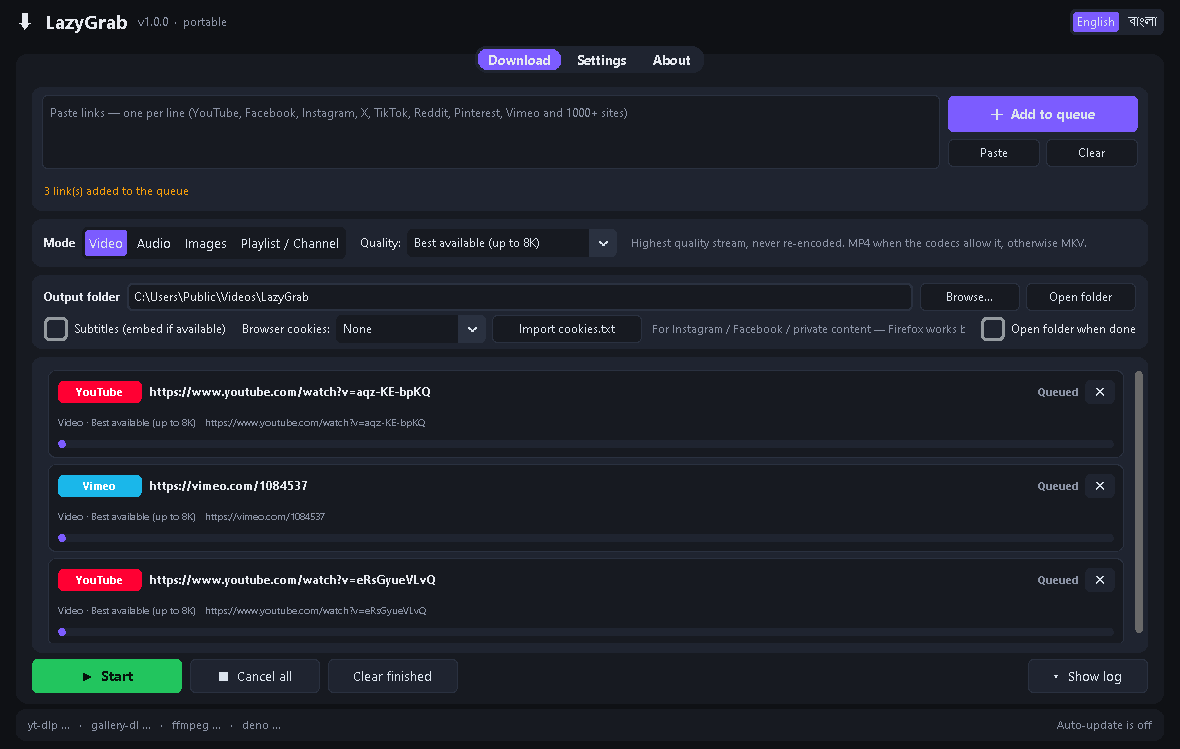
- Paste links into the big box — one per line. Mixed platforms are fine. Use the Paste button or Ctrl+V.
- Choose a mode (see below) and its options.
- Pick the output folder (remembered for next time).
- Press + Add to queue, then ▶ Start.
Each queue row shows the platform badge, the title (once known), a progress bar, speed, ETA and size. Press ✕ on a row to cancel or remove it, ↻ to retry a failed one, Show file to reveal the result in Explorer. Cancel all stops everything that is running; Clear finished tidies the list.
3. Modes
Video (default) — always the highest quality available
- Downloads the best video stream + best audio stream and merges them, up to 4K / 8K, HDR, 60 fps — whatever the site offers.
- Never downscales or re-encodes. The file is MP4 when the codecs allow it (H.264 / AAC, AV1 in MP4), otherwise MKV (YouTube's top formats are VP9 / AV1 + Opus, which land in MKV — this is the original quality, untouched).
- Quality drop-down: Best available (default) / 2160p / 1440p / 1080p / 720p — the cap is a maximum, LazyGrab still picks the best stream under it.
- Thumbnail and metadata (title, uploader, date, chapters) are embedded (can be turned off in Settings).
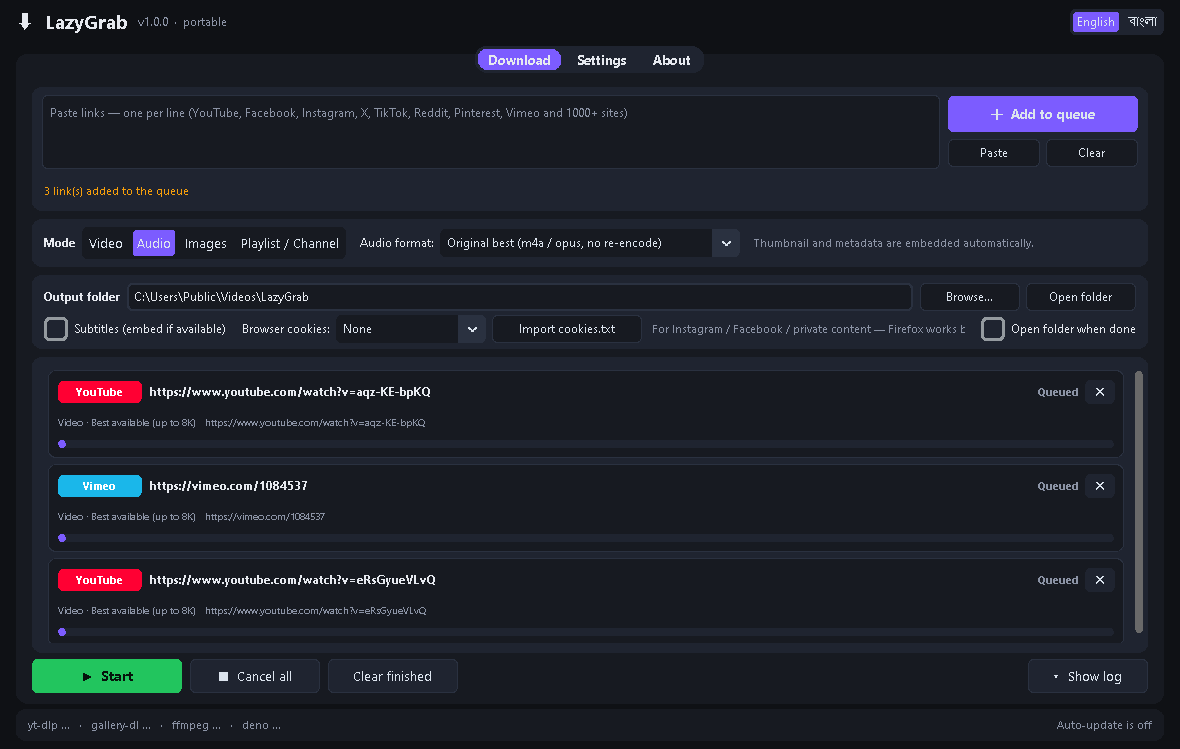
Audio
- Original best (default): takes the best audio stream as-is (m4a / opus). No re-encoding, no quality loss. Perfect for editing.
- MP3 320 kbps: converts to MP3 at 320 kbps for players that need MP3.
- Cover art and metadata are embedded in both cases.
Images
- Post / profile photos: uses gallery-dl to grab every image at original resolution from Instagram posts and
profiles, X posts, Pinterest pins and boards, Reddit galleries, Flickr, Tumblr, DeviantArt and many more.
Files are organised as
<output folder>\<site>\<user>\.... - Video thumbnail only: saves the thumbnail of any video link (YouTube, Vimeo, TikTok…) as JPG.
- Limit to first N items applies to profiles and boards.
Playlist / Channel
- Downloads every item of a YouTube playlist, a channel, a TikTok / Instagram profile, a Vimeo showcase, a SoundCloud set, etc.
- Download as: Video (best) / Audio (original) / Audio (MP3 320).
- Limit to first N items check-box — great for "just the latest 10".
- Items are saved into a sub-folder named after the playlist / channel, numbered in order.
4. Options
| Option | What it does |
|---|---|
| Output folder | Where files go. Default: Downloads\LazyGrab. Remembered. |
| Subtitles (embed if available) | Downloads the site's subtitles and embeds them into the video (MP4 / MKV). Languages in Settings. |
| Browser cookies | None / Firefox / Chrome / Edge / cookies.txt file. Needed for Instagram, Facebook, private, members-only and age-restricted content. |
| Import cookies.txt | Load a cookies file exported from your browser (see below). |
| Open folder when done | Opens the output folder in Explorer when the batch finishes. |
Cookies — read this if Instagram / Facebook fail
Many platforms only serve media to a logged-in browser. LazyGrab can borrow the login from your browser:
- Firefox — recommended. Log in to the site in Firefox, then pick Firefox under Browser cookies. Works reliably.
- Chrome / Edge often fail on Windows: since 2024 they lock their cookie store with "app-bound encryption" and show an error like "Could not copy Chrome cookie database". LazyGrab explains this in the row and suggests the fix:
- cookies.txt: install a "Get cookies.txt LOCALLY" style extension in Chrome / Edge, export the cookies for the site, then Import cookies.txt in LazyGrab. The cookie source switches to cookies.txt file automatically.
Cookies are only passed to yt-dlp / gallery-dl on your PC; nothing is uploaded anywhere.
5. Settings tab
- Language: English / বাংলা (also the toggle in the top-right corner).
- Filename template: default
%(title)s [%(id)s].%(ext)s(yt-dlp output-template syntax). Reset restores it. - Simultaneous downloads: 1–4.
- Update yt-dlp and gallery-dl at startup: on by default. This is what keeps LazyGrab working when YouTube, Instagram or TikTok change something. Update now runs it on demand.
- Embed thumbnail + metadata into videos.
- Subtitle languages: yt-dlp syntax, default
all,-live_chat(e.g.en.*,bnfor English and Bangla only). - Extra yt-dlp / gallery-dl arguments: for power users, appended to every command.
6. Progress, log and errors
- The progress bar parses yt-dlp's live output: percentage, speed, ETA, downloaded / total size. During merging, converting or embedding it switches to a moving "processing" bar. Playlists show item i of n.
- Show log opens a panel with the raw yt-dlp / gallery-dl output (exact command lines included). Copy log copies it — useful when asking for help.
- Friendly errors appear directly in the row:
| Message | Meaning / fix |
|---|---|
| Login required | Use Browser cookies (Firefox) or import cookies.txt |
| Sign-in / bot check | Same — the site wants a logged-in session |
| Private content | Only an account that can see it will work (cookies) |
| Age-restricted | Sign in through cookies |
| Geo-blocked / IP blocked | Not available in your region; a VPN may be needed |
| Rate-limited / blocking | Wait a few minutes; some networks are blocked by Reddit etc. |
| Could not read cookies from that browser | Chrome / Edge lock — use Firefox or cookies.txt |
| Not supported / not a direct link | Paste the link of the video / post / profile itself |
| Content unavailable | Deleted, removed or wrong link |
| Network error | Check the connection and retry |
7. Tips
- Mix modes in one queue: the mode is captured when you press Add to queue, so you can add videos, then switch to Audio and add more, then Start once.
- A
watch?v=…&list=…link downloads just the one video in Video / Audio mode and the whole playlist in Playlist mode. - Already downloaded files are skipped, not re-downloaded.
- Portable update: if a site breaks, open LazyGrab — the status bar shows the update result. If you are offline the check simply fails quietly and the app still works.
- Keep the output folder path short (e.g.
D:\Downloads). Windows limits a full path to 260 characters; very long titles inside a deep folder fail with a "path too long" message. - Advanced: drop a
yt-dlp.exe/gallery-dl.exeof your choice intobin\— LazyGrab uses whatever is there.
8. Requirements & limits
- Windows 10 / 11, 64-bit. No Python, no runtimes to install.
- ~330 MB on disk (FFmpeg and Deno are the bulk).
- Instagram photo posts and profiles need cookies (Instagram does not serve them anonymously). Instagram reels / videos usually work without cookies.
- X / Twitter needs cookies for NSFW or protected posts; public video tweets work without.
- Reddit blocks some networks / countries at its edge ("blocked by network security"); use cookies or a VPN there.
9. Disclaimer
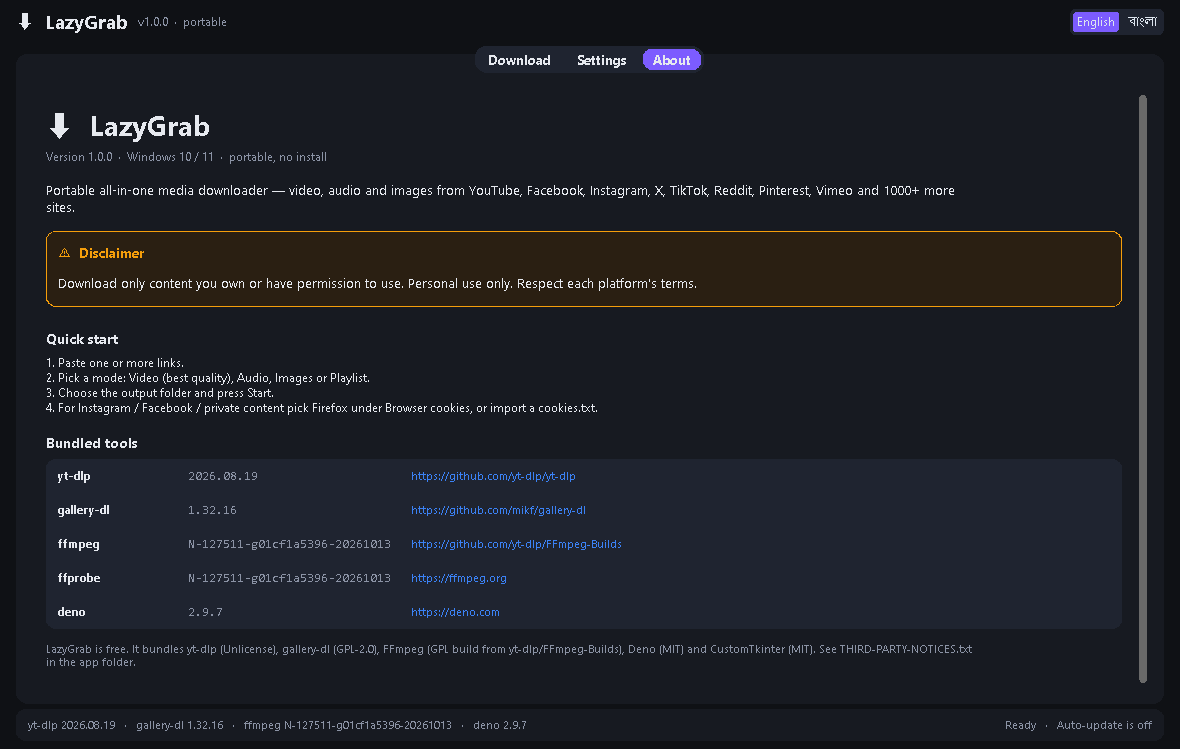
Download only content you own or have permission to use. Personal use only. Respect each platform's terms.
LazyGrab bundles yt-dlp (Unlicense), gallery-dl (GPL-2.0), FFmpeg (GPL build from yt-dlp/FFmpeg-Builds), Deno (MIT) and
CustomTkinter (MIT). Full notices in THIRD-PARTY-NOTICES.txt.