What it is
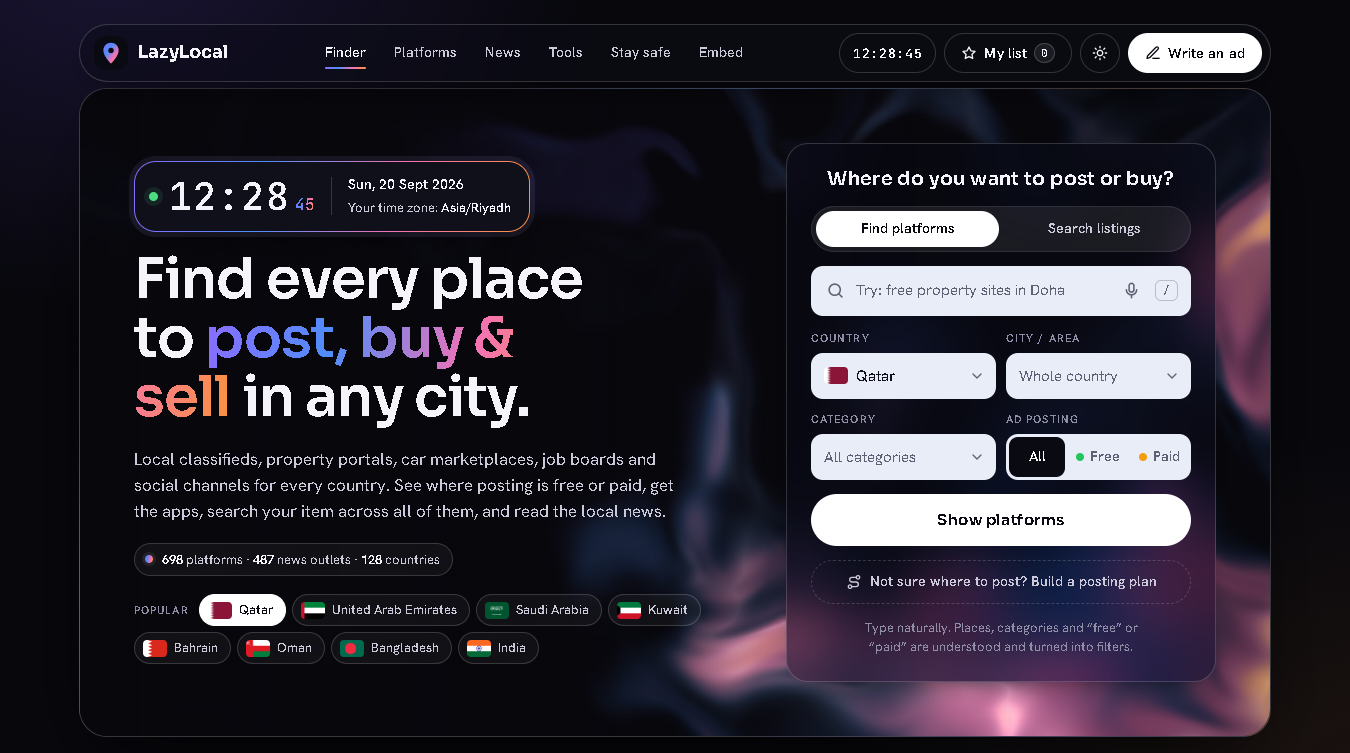
LazyLocal is a free web tool for people who buy, sell, rent and hire. Pick a country, a city and a category and it lists every place worth posting on or browsing there — local classifieds, property portals, car marketplaces, job boards, online marketplaces and social channels — and marks each one Free posting, Paid boost or Paid listings.
It does not host ads. It is a map: it shows where the buyers are, what posting costs, which platforms have an app, and it opens the right page on each of them. Around the finder sit a few small helpers: an ad writer, a posting plan, a posting checklist, a scam check, a currency converter, a world clock and a news section.
Nothing to download, nothing to install, no account. It opens in your browser at https://www.habibok.com/lazylocal/.
Who it is for
- Anyone selling a car, a phone or furniture who wants more than the one site everybody already knows.
- People who have just moved to a new country and do not know the local sites yet.
- Small businesses, agents and dealers comparing free and paid places to advertise.
- Buyers who want to search one item on every local platform without typing it ten times.
- People living abroad who want the news from home next to the news where they live.
Quick start
- Click Open LazyLocal at the top of this page.
- On the first visit the country is guessed from your device's time zone. If it is wrong, open Country and choose the right one. The choice is remembered on that device.
- Choose a City / area (or leave it on the whole country), a Category, and under Ad posting pick All, Free or Paid.
- Press Show platforms.
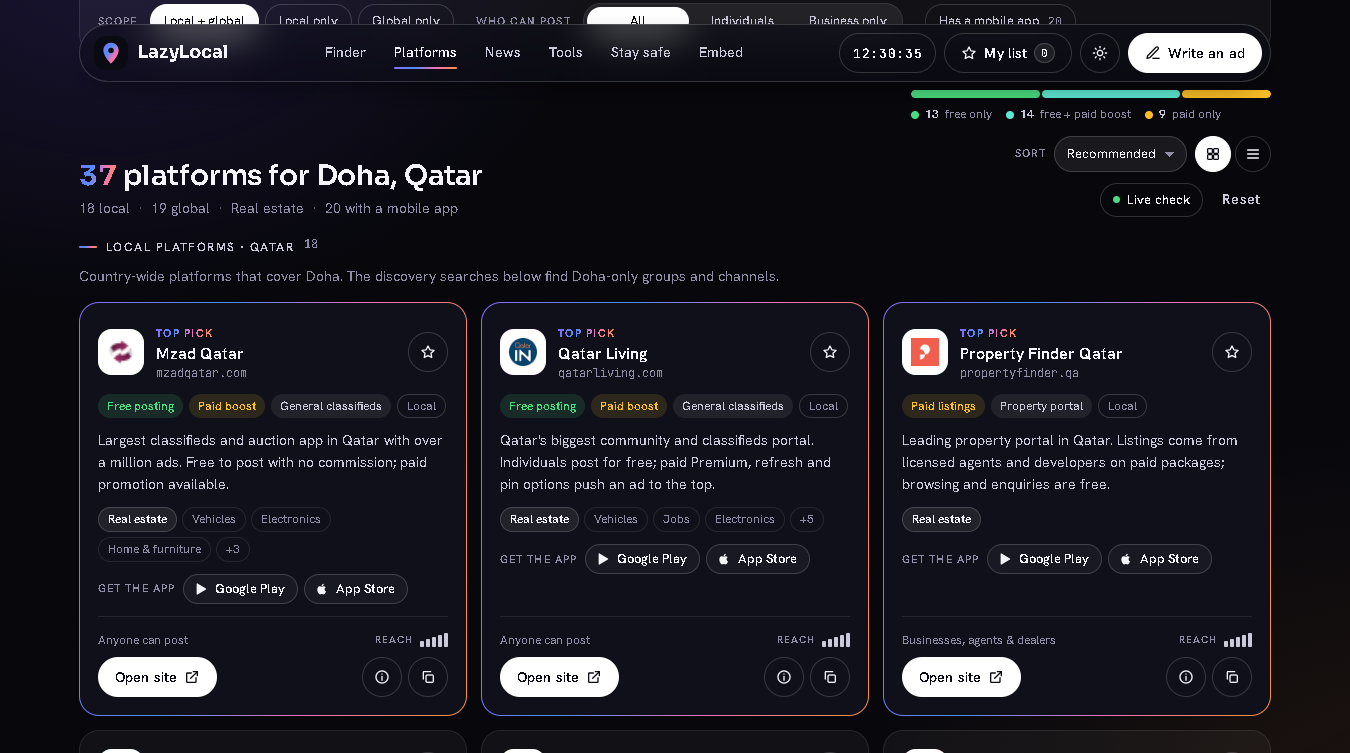
- The results come in two groups: Local platforms for your country first, then Global platforms that also work there. Up to three strong local sites carry a Top pick label.
- On each card: Open site goes to the platform, Post an ad appears where the platform has a direct posting page, the ⓘ button opens details and posting tips, the copy button copies the link, and the star saves the platform to your list.
Reading a card
| On the card | What it means |
|---|---|
| Free posting | A basic ad costs nothing. |
| Free posting + Paid boost | Free to post; paying is optional and buys a featured spot or a bump to the top. |
| Paid listings | Listing costs money, usually a package for agents, dealers, employers or advertisers. |
| Posting terms on site | The platform does not publish its terms, so LazyLocal does not guess. Check on the platform. |
| Browse only | An aggregator: you can search it but not post on it. |
| Reach bars, 1 to 5 | Roughly how big the audience is. |
| Anyone can post / Individuals / Businesses, agents & dealers | Who is allowed to post there. |
Narrowing the results
- Platform type chips with live counts: General classifieds, Property portal, Vehicle marketplace, Job board, Social & messaging, E-commerce marketplace, Auction, Services directory, Expat & community board, Paid ad network.
- Scope (Local + global, Local only, Global only), Who can post (All, Individuals, Business only) and Has a mobile app.
- Sort: Recommended, Most reach, Free first, A to Z. The two buttons next to it switch between card view and list view.
- Browse by sector tiles show how many local platforms cover Real estate, Vehicles, Jobs, Electronics and the rest.
- The country facts strip shows local time, weekend days, currency, dial code and web domain.
- Live check asks every site on screen whether it answers right now, from your own connection, and puts a coloured dot on each card.
- Reset clears every filter.
Smart search
Type the way you speak. The search box understands places, categories, "free" or "paid" and platform types, and turns them into filters.
| You type | LazyLocal understands |
|---|---|
free property sites in doha |
Doha, Qatar · Real estate · Free posting |
jobs in dubai |
Dubai, United Arab Emirates · Jobs |
paid classifieds uae |
United Arab Emirates · Paid or featured · General classifieds |
news in dhaka |
Dhaka, Bangladesh · News |
bikroy |
Looks for a platform with that name |
A line under the box shows Understood as …. Press Enter (or Show platforms) to apply it.
- Press
/anywhere on the page to jump to the search box. - Short names work:
uae,ksa,uk,chittagong,bombay. - If a name is not in your country (for example
bikroywhile you are in Qatar), LazyLocal shows where it is found instead of an empty page. - Your last few searches stay under the headline as one-tap Recent chips.
Search listings
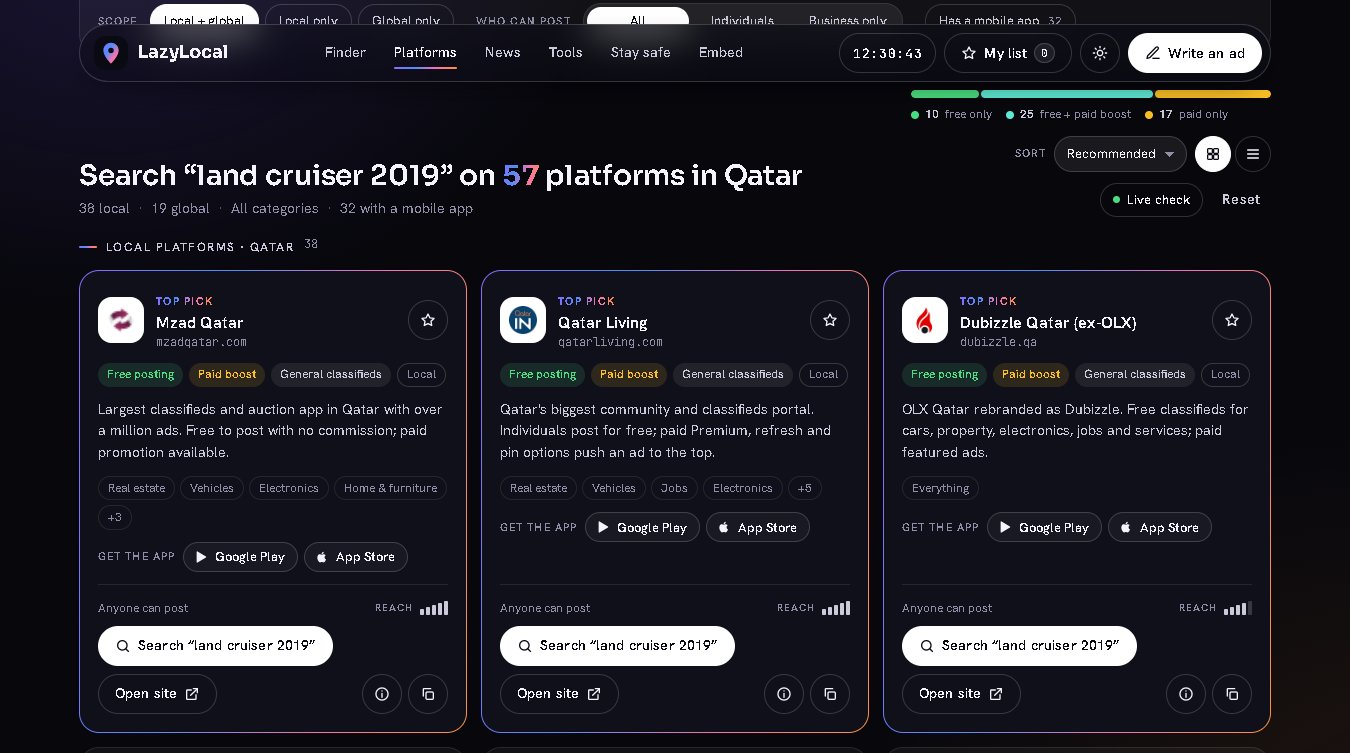
The finder has a second tab, Search listings. Use it when you are looking for an item, not for a platform.
- Click Search listings.
- Type the item once, for example
Land Cruiser 2019. Add a city to narrow it:land cruiser doha. - Press Search listings. Every platform card now has a Search "land cruiser 2019" button.
- The button opens that search on the platform itself. Where a platform has no public search link, the button runs a Google search limited to that site instead. Hover the button to see which of the two it is.
Switching to this tab clears the category, free / paid and type filters on purpose, so the item search starts broad. The details dialog of every platform also has a Search inside box that works the same way.
My posting list
A checklist of the platforms you plan to post on.
- Tap the star on any card to save it. The My list button in the top bar shows how many you have.
- Open My list. In Checklist, tick a platform once your ad is live there; the bar on top shows progress, for example "2 of 6 posted".
- Compare puts the saved platforms in one table: Free, Paid (optional boost or required), Who can post, Type and Reach.
- At the bottom: Write the ad, Build a plan, WhatsApp (sends the list as a message), Copy as text, Copy as CSV (for Excel or Google Sheets) and Clear.
The list is saved in this browser on this device only. News outlets cannot be starred, because the list is a posting checklist.
Ad writer
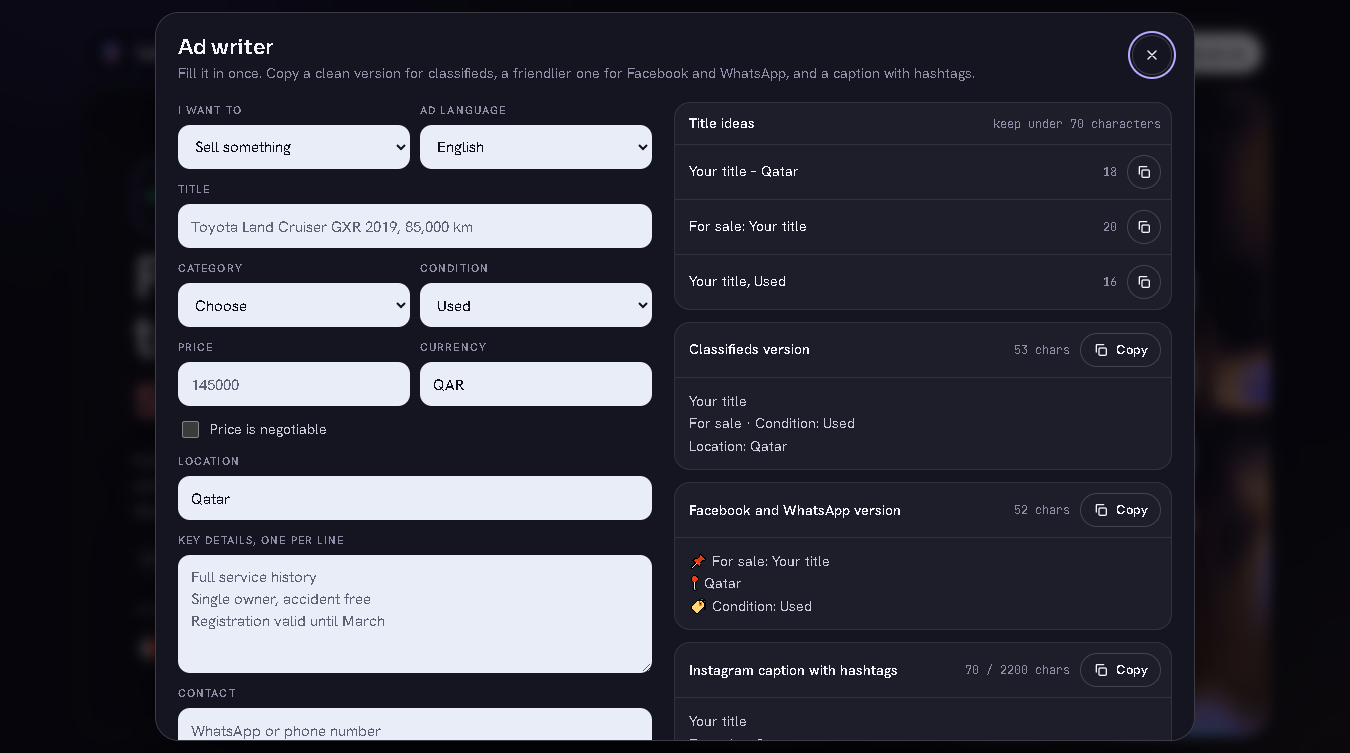
Press Write an ad in the top bar (or Ad writer in the toolbox). Fill in the form once:
- I want to — Sell something, Rent something out, Hire someone, Offer a service, or Find something (wanted).
- Ad language — English, Arabic or Bangla.
- Title, Category, Condition (New, Like new, Used), Price, Currency, Price is negotiable, Location, Key details (one per line) and Contact.
Location, currency and category are pre-filled from the finder. On the right you get, live:
| Output | Use it for |
|---|---|
| Title ideas | Three titles with a character count; keep them under 70 characters. |
| Classifieds version | A clean text ad for classifieds sites. |
| Facebook and WhatsApp version | The same ad in a friendlier layout with emoji markers. |
| Instagram caption with hashtags | Caption plus city and category hashtags, with a 2,200-character counter. |
Every box has a Copy button. The labels (Price, Location, Condition, Contact) are written in the chosen language and Arabic is laid out right-to-left, but your own words are not translated: write the title and the details in the language you chose. The draft is kept in your browser until you press Start over.
Posting plan
Not sure where to start? Click Not sure where to post? Build a posting plan under the finder, or Posting plan in the toolbox. The plan uses the country and city chosen in the finder and asks four questions:
- I want to — Sell something, Rent out a property or room, Hire staff, Offer a service, Promote a business.
- Category.
- I am posting as — An individual, or A business, agent or dealer.
- Budget — Free only, or I can pay to boost.
The answer is an ordered list in up to three groups:
- Start here — up to four local platforms where buyers in your place already look.
- Widen your reach — up to three free global channels (social, classifieds, community boards) that add audience without extra cost.
- Pay to go faster — only when you allowed paid options: paid local platforms and ad networks. Spend only after the free posts are live.
Save all to my list turns the plan into your checklist. Write the ad, WhatsApp and Copy plan sit next to it.
News
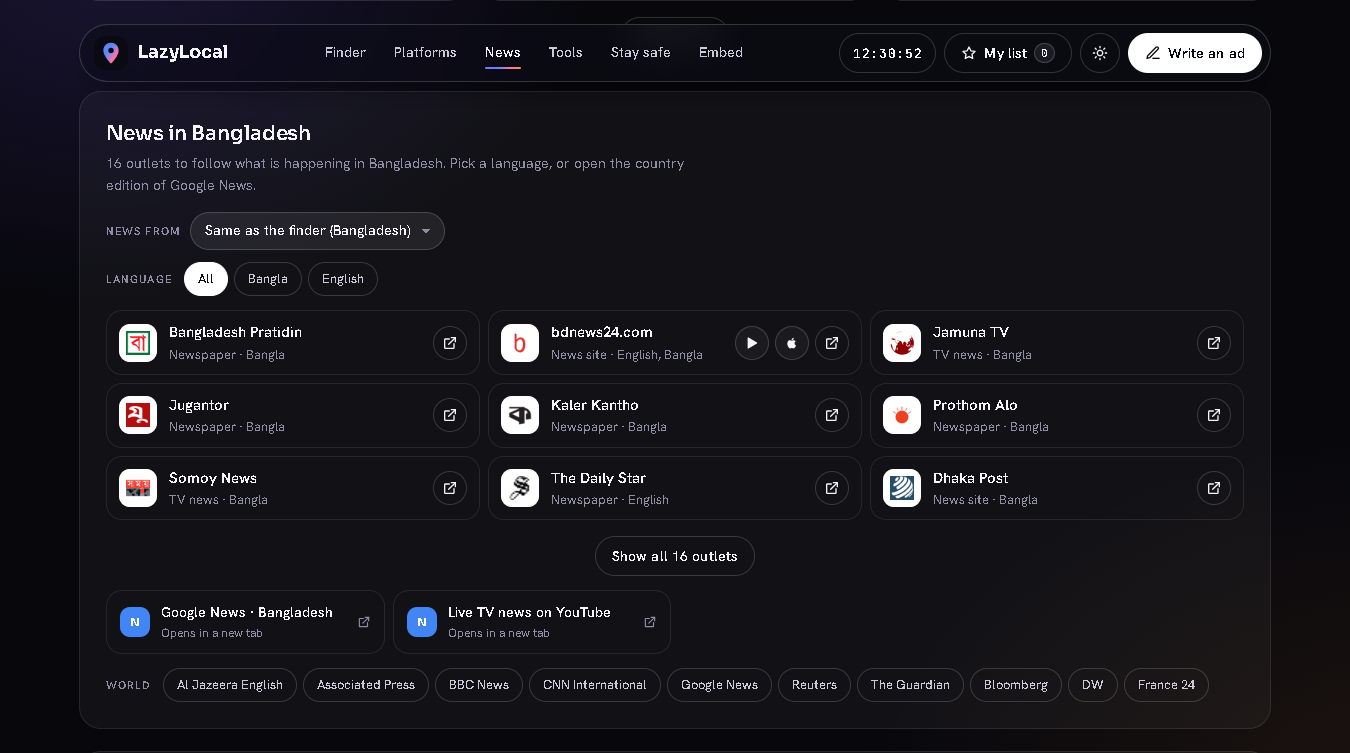
Below the platforms is News in your country: newspapers, TV channels, news agencies and portals — more than 480 outlets in 80 countries.
- News from follows the finder country by default. Change it to any other country, or to World, and it stays that way — so someone living in Qatar can keep Bangladesh news on the page.
- Language chips appear when a country has outlets in more than one language.
- The first nine outlets are shown; Show all opens the rest. Outlets with an app have Google Play and App Store buttons.
- Three quick links sit under the grid: the country edition of Google News, headlines about your city, and live TV news on YouTube.
news in dhakain the search box works too.
Toolbox
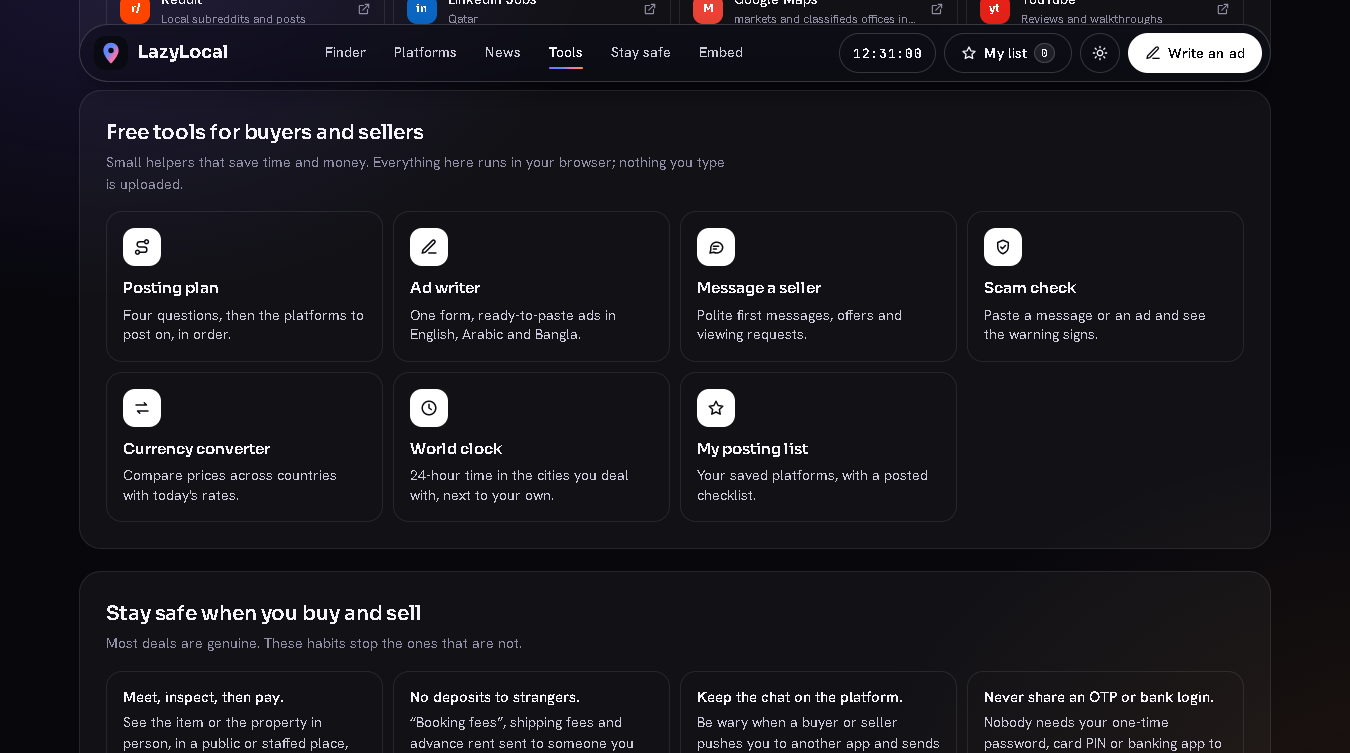
The section Free tools for buyers and sellers holds the helpers. Everything in it runs in your browser.
Scam check
Paste a message from a buyer or seller, the text of an ad, or a whole chat. LazyLocal looks for eleven common warning signs: asking for an OTP, PIN or card details; an overpayment-and-refund story; a deposit before you have seen anything; untraceable payment (wire services, gift cards, crypto); an unexpected fee to release something; a link to pay or to "receive" money; a person who is "abroad" and sends an agent; moving the chat off the platform; pressure to decide fast; a payment you cannot dispute; a guaranteed job, visa or income.
The result is a level — High risk, Be careful, Low risk, stay alert or No common warning signs found — with a short explanation for every sign it found. It knows English wording plus some common Arabic and Bangla phrases. It is a keyword check, not a verdict: "no warning signs" does not make a deal safe.
Currency converter
Amount, From, To and a swap button. Rates are mid-market rates from a free public exchange-rate service, refreshed at most every 12 hours. Banks and exchange houses add their own margin, so treat the number as a guide for comparing prices across countries.
World clock
Your own time, the time in the finder country and 19 cities (Qatar, Dubai, Riyadh, Kuwait, Dhaka, Kolkata, Karachi, Kathmandu, Colombo, Manila, Kuala Lumpur, Singapore, Cairo, Istanbul, London, Berlin, New York, Los Angeles, Sydney) in 24-hour format, with the difference from you, for example "+3h ahead". Daylight saving is followed automatically.
Message a seller
Type the item name and, if you like, your offer. Choose English, Arabic or Bangla and copy one of four polite messages: Is it still available?, Ask for details, Make an offer, Arrange a viewing.
App links and QR codes
- Platforms with a mobile app show Get the app with Google Play and App Store buttons right on the card.
- Turn on Has a mobile app to see only those platforms.
- Open a platform's details (ⓘ). Under Get the app there is a QR code for each store. On a computer, point your phone camera at the code and the store page opens on the phone.
- The QR code is drawn inside your browser by a small library served from this site; the link is not sent to any QR service.
- App links are collected from the stores and checked before they are added. Still, look at the publisher name in the store before you install anything.
Discovery searches
Discover more in your city is a row of ready-made searches for the chosen city and category: Google, Google limited to the country's web domain, Facebook Marketplace, Facebook Groups, Instagram hashtags, TikTok, X, Telegram channels, Reddit, LinkedIn Jobs, Google Maps and YouTube. They find the city-only groups and channels that no directory can list. Each one opens in a new tab.
Share or embed
Every filter lives in the page address, so the address bar always holds a link to exactly what you see. The section Share or embed this search has a Copy link button.
https://www.habibok.com/lazylocal/?country=QA&city=Doha&cat=real-estate
https://www.habibok.com/lazylocal/?country=BD&cat=vehicles&posting=free
https://www.habibok.com/lazylocal/?country=AE&type=property&who=b
https://www.habibok.com/lazylocal/?mode=listings&country=QA&q=land+cruiser
https://www.habibok.com/lazylocal/?country=&q=olx
| Parameter | Values |
|---|---|
country |
Two-letter country code; empty means worldwide |
city |
City name |
cat |
real-estate, vehicles, jobs, electronics, home, fashion, services, pets, business, rooms, community, news |
posting |
free or paid |
type |
classifieds, property, auto, jobs, social, ecommerce, auction, services, community, ads |
scope |
local or global |
who |
e for individuals, b for business only |
sort |
reach, free or az |
q |
Search text |
mode |
listings for an item search |
app |
1 shows only platforms with a mobile app |
theme |
dark or light |
embed |
1 for the compact mode used inside an iframe |
Embed. The same section gives an iframe code in compact mode, for placing the finder inside a page of your own website. Keep the iframe height relative to the screen (90vh), as in the generated code, so dialogs stay in view.
Stay safe
Most deals are genuine. These habits stop the ones that are not:
- Meet, inspect, then pay — in a public or staffed place.
- No deposits, booking fees or shipping fees to someone you have not met.
- Keep the chat on the platform; be wary of payment links.
- Never share an OTP, a card PIN or a banking login. Nobody needs them to pay you.
- Verify the paperwork: agent licence and ownership for property; registration, service history, fines and finance for vehicles.
- A price far below the market, urgency and a seller who is "abroad" usually go together.
Privacy
What stays in your browser. Your posting list, ad draft, posting-plan answers, seller-message draft, last currency pair and cached rates, theme, chosen country, news country, card or list view and recent searches are kept in the browser's local storage on your own device. They are never sent to LazyCreation or to anyone else; there is no account and no database behind the tool. The scam check, the ad writer and the smart search run on your device: what you type or paste there is not uploaded. LazyLocal does not set cookies of its own.
How the country is guessed. From your device's time zone and browser language. No network request is needed for that.
Third-party lookups made from your browser.
| When | What is contacted | Why |
|---|---|---|
| Page load (visitor bar) | A free geo-IP service: GeoJS, with ipwho.is as a fallback | To show "You are browsing from …" with your city, country and IP, and to pick a default country. Like any website you visit, that service sees your IP address. The result is shown only to you and is kept only until you close the tab. |
| Page load | Google Fonts, Google's favicon service, flagcdn.com | Fonts, platform icons (the platform's domain name is sent) and flag images. If they are blocked, the page falls back to initials and country codes. |
| Opening the currency converter | open.er-api.com | Downloads the public rate table. The amount you type is not sent. |
| Pressing Live check | Every site shown on screen, plus one cdnjs.cloudflare.com test address | Your browser asks each site whether it answers. Each site sees an ordinary visit from your IP address; no referrer is sent. |
The address bar. Filters and the search text are part of the page address — that is what makes sharing work — so they appear in your browser history, and in the link if you share it.
Links you open. Platform, Google, social, WhatsApp and app-store links open in a new tab on those sites, and their own privacy rules apply from there. The WhatsApp buttons put your list or plan into the message text.
Clearing everything. Use Clear in My list and Start over in the ad writer, or clear the site data for habibok.com in your browser.
FAQ
Is it really free? Yes. LazyLocal is free to use, with no account. The platforms it links to set their own prices; the badges tell you which ones are free.
Does LazyLocal post my ad for me? No. It shows where to post and opens the right page. You publish the ad on each platform with your own account there.
Does the ad writer translate my text? No. It writes the labels and the layout in English, Arabic or Bangla. Write your title and details in that language yourself.
How accurate is "free" and "paid"? Posting rules and prices change often, so LazyLocal describes them in general terms and links out. Always confirm on the platform before paying. When a platform does not publish its terms, the card says Posting terms on site.
My country shows no local platforms. The global platforms listed below still work there, and the discovery searches usually surface the local favourites. Know a good local site? Email the name and the link to info@habibok.com.
It picked the wrong country. Choose the right one under Country; it is remembered. A VPN changes what the visitor bar shows.
Why does the page show my city and IP address? That is the visitor bar. Only you see it. It is looked up from your own browser and is not stored by LazyCreation.
Live check says "no answer" for a site that works. The check runs from your connection. An office network, a country-level block or an ad blocker can stop it. Open the site to be sure.
The currency rates did not load. You are offline, or something blocks the rate service. Try again later; the last downloaded rates are reused when the service cannot be reached.
My list disappeared. The list lives in one browser on one device. A private window, clearing browsing data or switching browsers starts a new, empty list. Use Copy as CSV to keep a copy.
Does it work on a phone? Yes. The layout adapts to phones, tablets and computers, in dark and light themes; the sun / moon button switches between them.
How fresh is the directory? The footer shows when the directory was last updated and, while that check is recent, the date on which every link was last tested.
I found a dead link or a wrong detail. Email info@habibok.com with the platform name and what is wrong.
Changelog
v1.0.0 — First public release on the LazyCreation Store: platform finder with smart search and listing search, posting list, ad writer, posting plan, news, toolbox, app links with QR codes, discovery searches, share and embed.